1 Communication between the SMC-PROCON
1.1 Introduction
SMC is the access controller, PROCON is the protocol conversion device for the elevator to communicate with the access controller. This document defines the communication protocol between SMC and PROCON using RS-485 bus for communication.
1.2 Overview
The communication between SMC and PROCON is summArized as follows:
1) SMC sends a token to PROCON of each bank.
2) Whether SMC sends a data packet to PROCON or PROCON responds to SMC, it needs to wait for the token. (Data packet and token are used together)
3) After PROCON receives a data packet sent by SMC to its own group (excluding data packets sent to all groups), it sends 1 data packet to SMC (that is, it receives 1 data packet and responds to 1 data packet)
4) If SMC does not receive a response from PROCON, it considers PROCON to be faulty.
5) Data from SMC and PROCON are not sent repeatedly.
1.3 Basic Specifications
The basic specifications of SMC-PROCON communication are shown in Table 1-1.
Table 1-1 Basic specifications of SMC-PROCON communication
| project | specifications | remarks | |
| 1 | Electrical character | RS-485 | |
| 2 | Number of nodes connected | MAX 9 | SMC…1,PROCON…MAX8 |
| 3 | Overall arrangement | Bus connection, half- duplex | |
| 4 | Communication distance | 1200 Meters | |
| 5 | Data composition | Start bit (1 bit) | |
| 6 | Velocity | 9600bps | |
| 7 | Actual transfer speed (maximum) | ||
| 8 | Data volume(maximum) | 30 bytes | |
| 9 | Conflict avoidance | Token type | SMC-Primary (master) |
| 10 | Receive confirmation | not have | |
| 11 | Data guarantee | Parity check per byte + checksum check per message | |
| 12 | Failure detection | No normal message was received within the specified time. |
1.4 Data Format
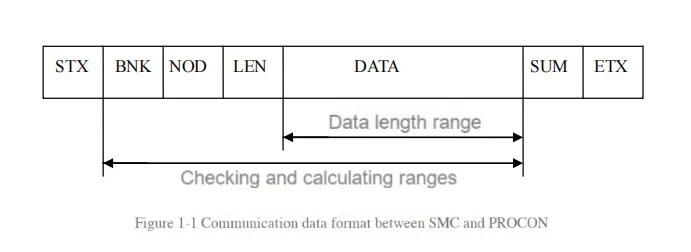
Note: For an empty packet, the length (LEN) is 0 and there is no data area (DATA).
Table 1-2 The SMC-PROCON communication code
| Communication code | Content | Remarks |
| STX | Start code (02h) | |
| BNK | Send / reply to the group group number | |
| NOD | Node number within the group | |
| LEN | DL | |
| DATA | data | Up to 24 bytes |
| SUM | check sum | |
| ETX | End code (03h) |
① STX (start code)
Indicates the start of communication data. The setting value is 02h.
② BNK (send group number)
Indicates the send/response group number. The group number setting is shown in Table 1-3.
Table 1-3 Group numbers
| Group number | cluster | Transfer direction |
| 00h~07h | Group 1~8 (sending group) | SMC to PROCON |
| 7F | All Groups | |
| 80h~87h | Group 1~8 (Answer Group) | PROCON to SMC |
Note: When sending to all groups, PROCON does not reply.
③ NOD (node in group)
Indicates the node number in the sending/replying group. The node number is shown in Table 1-4.
Table 1-4 Node number
| Node number | Node | Remarks |
| 01h | Group management | *1,*2 |
| 03h~0Ah | Machine #F~#D | *2 |
| 80h | PROCON | PROCON returns to SMC empty package |
| FFh | Group management, full-number machine | SMC to PROCON only |
*1 In the case of a single elevator, two units are connected in parallel, the data comes from the group management module, and the sending node is #F to #D. The NOD returned by PROCON to SMC is 03h~0Ah, which is determined by the group management, not 01h.
*2 In the case of SMC to PROCON, the node number in the group. When the car card is swiped, NOD sends 03h~0Ah (#F to #D); when the floor station card is swiped, NOD must send 01h (group management). If there are multiple single elevators, different bank numbers are used to distinguish which elevator is called, because NOD always sends 01h.
④ LEN (length)
Indicates the data length, i.e. the data length in Figure 1-1, in bytes.
⑤ DATA (data)
Indicates the data body to be transmitted.
⑥ SUM (checksum)
Indicates the checksum, the calculation method of the checksum is: SUM= ~(BNK+NOD+LEN+DATA)+1.
⑦ ETX (end code)
Indicates the end of communication data, ETX is 03h.
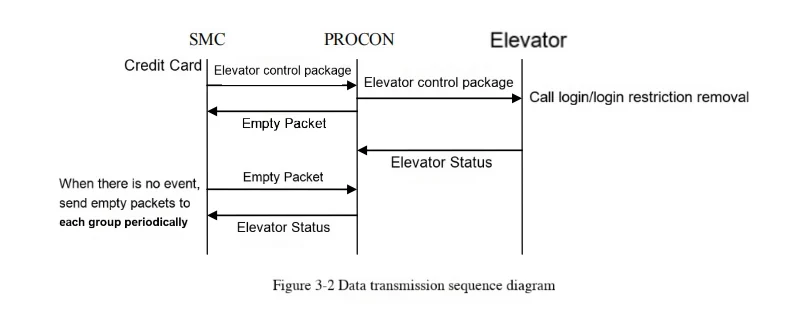
1.5 Data transmission order
When SMC-PROCON communicates, the data transmission sequence is as follows:
① When the card is swiped, SMC sends the elevator control packet to PROCON. After the SMC data packet is sent, the next packet will not be sent before receiving the response from PROCON.
▲ When PROCON detects a minor fault, the next packet can be sent.
▲ When the whole group is in operation, the next packet can be sent without waiting for a response. (After the transmission is completed, the next packet will be sent after 10ms.)
② PROCON receives the data packet sent by SMC to its own group (including the whole group), and then sends the data packet to the elevator. If it is for its own data packet, it replies to SMC with the elevator status or an empty packet.
▲ Start responding within 10ms after receiving the data packet from SMC.
▲ No response is required for the whole group.
③ SMC receives the data packet from PROCON, processes the received data, and then sends the next packet. (Starts sending 10ms after receiving.)
④ When no event occurs, SMC sends empty data packets to PROCONs except for major faults in sequence.
▲ After SMC receives the data packet sent by PROCON, it can start sending new data packets to PROCON after 10ms.
▲ SMC does not send the next data packet if it does not receive a response from PROCON. (When PROCON has a minor fault, it can send the next data packet).
▲ When there is an event interruption, when it is idle again, it continues to send empty packets from the interruption point. Group 8 is followed by group 1. PROCONs with major faults are skipped.
▲ Skip when encountering a group that is not connected (building specifications do not exist).
⑤ When no event occurs, SMC sends a null packet to the seriously faulty PROCON every second.
▲ If there is no connected group (building specification does not exist), it will be skipped.
⑥PROCON receives the empty packet from SMC. If the elevator has a status packet, it returns the status packet to SMC. If not, it returns an empty packet to SMC.
1.6 Data transmission timing
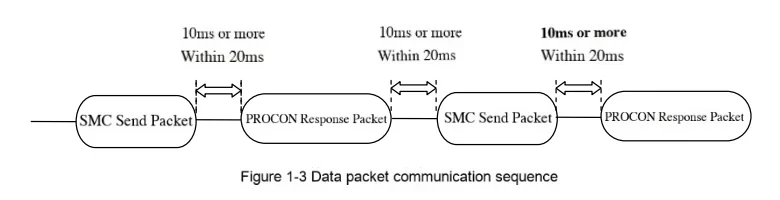
The communication sequence between SMC and PROCON is shown in Table 1-5:
Table 1-5 DATA sending timing
| project | price | remarks |
| Time interval between the data packets | Above 10ms, and within 20ms | |
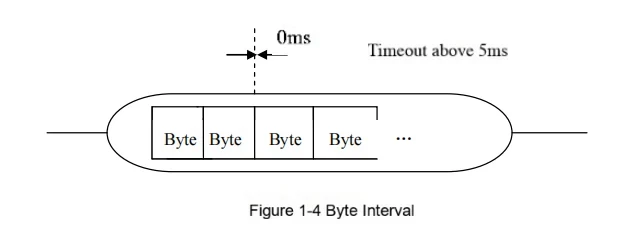
| The time interval between the bytes | 0ms | Serial send |
| receive timeout | More than 5ms |
*To ensure system response, the byte interval is 0, that is, data is sent continuously.
*During data packet reception, if the byte interval exceeds 5ms, this data packet is discarded and returns to the STX waiting state.
1.7 Fault Detectio
The fault detection of communication between SMC and PROCON is summarized as follows:
1.7.1 SMC fault detection
SMC sends a data packet to PROCON. PROCON does not respond within the specified time, and a PROCON fault is detected. The fault detection conditions are shown in Table 1-6.
When the communication cable is cut, all PROCON serious faults are detected.
Table 1-6 SMC fault detection conditions
| Classify | Fault name | Discharge detection conditions | Troubleshooting conditions | Remarks |
| Individual failure | PROCON Light fault | PROCON The SMC packet was received and was not answered after 100ms | PROCON From SMC and respond within 100ms | The timeout period is the time from when SMC starts sending to when SMC receives the response data packet sent by PROCON. |
| PROCON Heavy fault | The above situation occurred 4 consecutive times | Ditto | Ditto |
When PROCON has a minor fault, SMC can send the next data packet.
When PROCON has a major fault, SMC does not send the data packet when the card swipe event occurs. The card swipe event is discarded.
When no event occurs, an empty packet is sent to skip the PROCON with a major fault. However, an empty packet is sent to the PROCON with a major fault every 1 second.
When PROCON is normal, the maximum communication recovery time is 8 seconds.
1.7.2 PROCON Fault Detection
After receiving the data packet from PROCON, SMC fails to send it back within the specified time, and detects SMC fault. The fault detection conditions are shown in Table 1-7.
Table 1-7 PROCON fault detection conditions
| Classify | Fault name | Discharge detection conditions | Troubleshooting conditions | Remarks |
| Individual failures | SMC failure | There is no communication between the SMC and any PROCON within 400ms. | SMC communicates with PROCON within 400ms | The timeout period refers to the time from the end of the last packet reception. |
When SMC fails, the data sent by PROCON to the elevator side is discarded.
When SMC recovers, the old data is no longer sent.
2 Communication between SMC and elevator
2.1 Fault detection
2.1.1 SMC fault detection
SMC did not receive the elevator status returned by PROCON within the specified time and detected an elevator failure.
Table 2-8 SMC detects elevator faults
| Classify | Fault name | Detection conditions | Eliminate conditions | Remarks |
| System fault detection | Elevator failure | No elevator status information from each group has been received for more than 4 seconds | Receive elevator status from each group |
2.2 Elevator fault detection
The elevator (group management/group management module) did not receive the SMC heartbeat within the specified time and detected an SMC fault.
Table 2-9 Elevator SMC fault detection
| Classify | Fault name | Detection conditions | Eliminate conditions | Remarks |
| System fault detection | SMC hitch | No SMC heartbeat was received for more than 20 seconds | Received a heartbeat from the SMC |
3 Communication data
The SMC-elevator communication data is summarized as follows.
3.1 SMC->elevator communication data
3.1.1 Elevator control
(1) Swipe card at the landing (single floor)
| NO | D7 | D6 | D5 | D4 | D3 | D2 | D1 | D0 |
| 1 | Command word: 0x01 | |||||||
| 2 | Serial number: 0x00~0xFF | |||||||
| 3 | Card swipe location: floor 0, access control 1, home 2 | Straight | Destination layer (rear) | Corresponding departure floor station button (0~7) | ||||
| 4 | Take the elevator floor (0~127 management level) | |||||||
| 5 | Female | Kid | Elder | Administrator | VIP | Elevator call mode automatic: 0x00 | ||
| 6 | Go to the destination floor (0~127 management level) FFh: All floors (administrators) | |||||||
(2) Card swiping in the elevator (single floor)
| NO | D7 | D6 | D5 | D4 | D3 | D2 | D1 | D0 |
| 1 | Command word: 0x09 | |||||||
| 2 | Serial number: 0x00~0xFF | |||||||
| 3 | Preparation | Preparation | Straight | Destination layer (rear) | Preparation | Preparation | Control box properties (front door general 0; front door special 1; back door general 2; back door special 3) | |
| 4 | Female | Kid | Elder | Administrator | VIP | Elevator call mode automatic: 0x00 | ||
| 5 | Go to the destination floor (0~127 management level) FFh: All floors (administrator) | |||||||
| 6 | Preparation | Preparation | Preparation | Preparation | Preparation | Preparation | Preparation | Preparation |
(3) Card swiping in the elevator (multiple floors)
| NO | D7 | D6 | D5 | D4 | D3 | D2 | D1 | D0 |
| 1 | Command word: 0x09 | |||||||
| 2 | Serial number: 0x00~0xFF | |||||||
| 3 | Preparation | Preparation | Straight | Preparation | Preparation | Preparation | Control box properties (front door general 0; front door special 1; back door general 2; back door special 3) | |
| 4 | Female | Kid | Elder | Administrator | VIP | Elevator call mode automatic: 0x00 | ||
| 5 | Rear door length | Front door length | ||||||
| 6 | Front door 7 | Front door 6 | Front door 5 | Front door 4 | Front door 3 | Front door 2 | Front door 1 | Front door 0 |
| 7 | Front door 15 | Front door 14 | Front door 13 | Front door 12 | Front door 11 | Front door 10 | Front door 9 | Front door 8 |
| 8 | Front door 23 | Front door 22 | Front door 21 | Front door 20 | Front door 19 | Front door 18 | Front door 17 | Front door 16 |
| 9 | Front door 31 | Front door 30 | Front door 29 | Front door 28 | Front door 27 | Front door 26 | Front door 25 | Front door 24 |
| 10 | Front door 39 | Front door 38 | Front door 37 | Front door 36 | Front door 35 | Front door 34 | Front door 33 | Front door 32 |
| 11 | Front door 47 | Front door 46 | Front door 45 | Front door 44 | Front door 43 | Front door 42 | Front door 41 | Front door 40 |
| 12 | Front door 55 | Front door 54 | Front door 53 | Front door 52 | Front door 51 | Front door 50 | Front door 49 | Front door 48 |
| 13 | Front door 63 | Front door 62 | Front door 61 | Front door 60 | Front door 59 | Front door 58 | Front door 57 | Front door 56 |
| 14 | Backdoor 7 | Backdoor 6 | Backdoor 5 | Backdoor 4 | Backdoor 3 | Backdoor 2 | Backdoor 1 | Backdoor 0 |
| 15 | Backdoor 15 | Backdoor 14 | Backdoor 13 | Backdoor 12 | Backdoor 11 | Backdoor 10 | Backdoor 9 | Backdoor 8 |
| 16 | Backdoor 23 | Backdoor 22 | Backdoor 21 | Backdoor 20 | Backdoor 19 | Backdoor 18 | Backdoor 17 | Backdoor 16 |
| 17 | Backdoor 31 | Backdoor 30 | Backdoor 29 | Backdoor 28 | Backdoor 27 | Backdoor 26 | Backdoor 25 | Backdoor 24 |
| 18 | Backdoor 39 | Backdoor 38 | Backdoor 37 | Backdoor 36 | Backdoor 35 | Backdoor 34 | Backdoor 33 | Backdoor 32 |
| 19 | Backdoor 47 | Backdoor 46 | Backdoor 45 | Backdoor 44 | Backdoor 43 | Backdoor 42 | Backdoor 41 | Backdoor 40 |
| 20 | Backdoor 55 | Backdoor 54 | Backdoor 53 | Backdoor 52 | Backdoor 51 | Backdoor 50 | Backdoor 49 | Backdoor 48 |
| 21 | Backdoor 63 | Backdoor 62 | Backdoor 61 | Backdoor 60 | Backdoor 59 | Backdoor 58 | Backdoor 57 | Backdoor 56 |
3.1.2 Fault Detection
(1) SMC heartbeat
| NO | D7 | D6 | D5 | D4 | D3 | D2 | D1 | D0 | Sending cycle 5s |
| 1 | Command word: 0x11 | ||||||||
| 2 | Preparation | Preparation | Preparation | Preparation | Preparation | Preparation | Preparation | Preparation | |
| 3 | Preparation | Preparation | Preparation | Preparation | Preparation | Preparation | Preparation | Preparation | |
(2) Elevator status
| NO | D7 | D6 | D5 | D4 | D3 | D2 | D1 | D0 | Sending cycle 1s |
| 1 | Command word: 0x11 | ||||||||
| 2 | #D | #C | #B | #A | #I | #H | #G | #F | Running 1, Stopping 0 |
| 3 | Preparation | Preparation | Preparation | Preparation | Preparation | Preparation | Preparation | Preparation | |