1. Control Panel LEDs
-
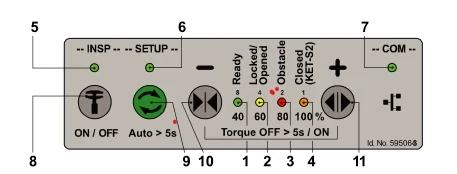
Green: "Ready"
-
Yellow: "locked/Open"
-
Red: "Obstruction/Light Curtain"
-
Orange: "Door Fully Closed (KET-S2)"
-
Green: "INSP Inspection Switch"
-
Green: "Setup/Auto-LeArning"
-
Green: "COM" Communication Status
2. Control Keys
-
8. INSP: Inspection Mode Toggle
-
9. SETUP: Auto-Learning Key
-
10. DRET-S (–/Close): Manual Door Close
LED Blink Patterns & Troubleshooting
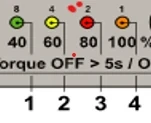
LEDs 1-2-3-4 Status
| Blink Pattern | Indication | Action Required |
|---|---|---|
| All LEDs slow blink | Door error | Check SMLCD error log |
| All LEDs steady | Standby mode | — |
| — | Reference run not executed | Close door until locked |
| — | Safety device active (KSKB/KOKB/RPHT/KTL/KTFP) | Clear obstruction |
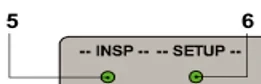
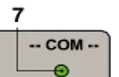
LEDs 5-6-7 Status
| Blink Pattern | Indication | Resolution |
|---|---|---|
| LED 5 slow blink | INSP active via elevator controller (EC) | — |
| — | Auto-setup error | Retry learning procedure |
| — | CAN communication failure | Check wiring & EC status |
| — | Communication error (EC not ready) | Verify physical connections |
| — | Software download error | Restart download & check wiring |
| — | Bootloader mode active | Wait for completion |
3. Auto-Learning Procedure
-
Preparation:
-
Ensure car-top inspection switch (JREC) is ON.
-
Power ON the door operator.
-
Position elevator at floor level (include landing doors if possible).
-
-
Enter Inspection Mode:
-
PressINSP key (LED 5 ON).
-
-
Start Auto-Learning:
-
HoldSETUP key (LED 6)for>5 seconds.
-
LED 6 slow blink: Learning in progress.
-
-
Learning Sequence:
-
Door opens slightly → Locks.
-
Cycle 1: Open/close at reference speed.
-
Cycle 2: Open/close at reduced speed.
-
Cycle 3: Open/close at normal speed.
-
LED 6 OFF: Auto-learning successful.
-
-
Troubleshooting Failures:
-
*LEDs 1-4 & 6 rapid blink*: Setup error.
-
PressSETUP keyto clear error.
-
Common Auto-Learning Errors
| Code | Error Description |
|---|---|
| 1 | General motion error |
| 2 | Door stopped by external command |
| 3 | Safety device activation |
| 4 | Timeout (auto-setup failed) |
| 5 | 837 Locking position failure |
| 6 | 832 KET-S2 sensor fault |
| 10 | Open position <300mm or KET-S2 position too small |
| 12 | Door mass <10kg |
| 13 | Spring constant out of range (-30 to 200 N/m) |
| 14 | Invalid config: Spring >15 N/m + door mass >120kg |
4. Speed & Position Adjustment
A. Adjust Opening/Closing Speed
-
EnterInspection Mode(LED 5 ON).
-
PressSETUP key for 1s(LED 6 ON).
-
PressOPEN/CLOSE keysto cycle through speed levels:
-
LEDs 1-4: 40% / 60% / 80% / 100% speed.
-
-
PressSETUP keyto save (LED 6 OFF).
B. Adjust Door Opening Width
-
EnterInspection Mode(LED 5 ON).
-
PressOPEN keyto fully open door.
-
PressSETUP key for 1s(LED 6 ON).
-
TapOPEN/CLOSE keysto adjust width:
-
OPEN key: Increase width.
-
CLOSE key: Decrease width.
-
-
PressSETUP keyto save (LED 6 OFF).
Key Notes for Technicians
-
Always verify landing door engagement during auto-learning.
-
Spring constant errors (Code 13/14) require mechanical adjustment.
-
Use CAN analyzer for persistent communication faults (LED 7 errors).