1. Purpose
To configure STM monitoring parameters for S3600/S3300AP elevators using software V10.07 and STMM+. Incorrect settings post-initial learning trip trigger "97" status (persistent error with limited operation).
2. Critical STM Parameters (Menu 40 → CF28)
| CF | PA | Parameter | Value Range | Description | Access |
|---|---|---|---|---|---|
| 28 | 2 | STM Bend Count Warning | 50–90% | % of max trips to trigger STM replacement warning (read-only, chipcard-derived) | SIM ≥10.00 |
| 28 | 3 | STM Bend Count Limit | 0–108,000 (1=1,000 trips) | Max permitted trips. Exceeding causes elevator shutdown (read-only, chipcard-derived) | SIM ≥10.00 |
| 28 | 4 | STM Manufacturing Date | 10100–75399 (DWWYY format) | Mandatory setting: - D: Weekday (1–7)- WW: Year week (01–53)- YY: Year (00–99) | SIM ≥10.00 |
| 28 | 8 | STM Aging Limit | 0–65,000 (1=1 month) | Max STM age. Exceeding causes shutdown (read-only, chipcard-derived) | SIM ≥10.00 |
| 28 | 9 | STM Bend Counter | 0–4,000,000 (1=100 trips) | Editableonlyafter activating Menu 190 | Requires Menu 190 |
3. Procedure: STM Manufacturing Date Retrieval
-
Access STM Belt:
-
Position car at roof-access level using inspection mode.
-
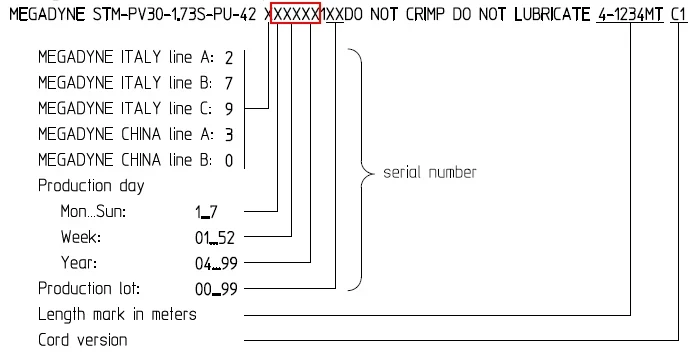
Locate 5-digit code on STM belt back (e.g.,
27942):-
Digit 1 (D):Weekday (1=Mon–7=Sun)
-
Digits 2–3 (WW):Year week (01–53)
-
Digits 4–5 (YY):Year (00–99)
-
-
Example:
27942→ Weekday 2 (Tue), Week 79, Year 42.
-
-
Record Oldest Date:
-
Note the earliest manufacturing date across all belts.
-
4. Configuration Steps
-
Post-Learning Trip:
-
Elevator enters normal operationOR"97" status.
-
-
Set Date/Time (Menu 40):
-
Configure local time/date via:
-
CF04 PA2(Time) -
CF04 PA5(Date)
-
-
-
Input STM Date (CF28 PA4):
-
Enter 5-digit code from Step 3.
-
-
Reset & Verify:
-
Exit config mode → Set
Menu 101 = 1(fatal error reset). -
Perform system reset.
-
-
Validate Settings (Menu 60):
-
601: Trip count (1 unit = 100 trips) -
631: ≈601 × 3(S3300AP)or601 × 2(S3600) -
632: STM expiry date (manufacture date + 15 years)
-
5. Troubleshooting
-
Mismatched
631Value?-
Set
Menu 190 = 1(5-minute edit window). -
Enter
Menu 40→ AdjustCF28 PA9:-
S3300AP:
Value = Menu 601 × 3 -
S3600:
Value = Menu 601 × 2
*Note: 1 unit = 100 bends*
-
-
Exit config mode.
-
6. Error Handling
| Error | Cause | Solution |
|---|---|---|
| 97 Status | Missing/invalid STM parameters | ConfigureCF28 PA4+ reset |
| 4611 | Commissioning number error | EditCF28 PA6after activating Menu 190 |
This guide ensures compliance with SW V10.07/STMM+ requirements. Retain chipcard-derived defaults unless manual override is necessary.