1. Login
► Log in to SMLCD.
► Read the operating counter (ZQF) from the menu Statistics → CAr Trips.
► Alternatively, use iSPECI to read the operating counter information.
Full access to all menu items requires logging in with a password.
The characteristics of the Login/Logout menu item in the SMLCD top-level menu are as follows:
– When not logged in, the menu item is "Login".
– After successful login, the menu item will change to "Logout".
– After logging out, the menu item will change back to "Login", and the display will switch back to the elevator status display.
– Automatic logout occurs after 30 minutes of no user interaction.
– The password can be edited using CADI.
► Select Login from the top-level menu (when not logged in):
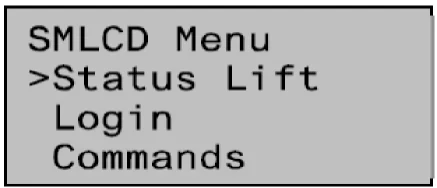
► Enter the 4-digit password ABCD at the 'Password =' prompt.
► Status display: Login successful or Login failed.
2. Error Log
► Enter the 4-digit password ABCD at the 'Password =' prompt.
► Status display: Login successful or Login failed.
► Check on the HMI.
Note:
The system error log, containing the 20 most recent errors, can be accessed through the ErrorLog menu. The error log does not display any status information recorded in the system error log.
► Select ErrorLog from the top-level menu.
► Alternatively, use iSPECI to read the error log information.
Show and Show All
Note:
The Show and Show All functions in the ErrorLog menu display the 20 most recent errors. Use Show to display only errors that may prevent the elevator from operating, and use Show All to display all errors. When using Show, errors related to software development are not displayed.
► Select Show or Show All in the ErrorLog menu.
► Display the most recent errors (new).
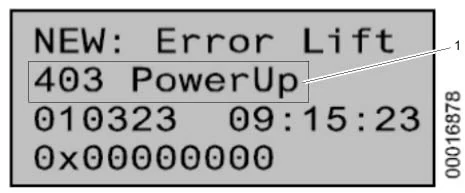
1 Malfunction
Note:
When selecting the "NEW" fault index, the latest faults will always be displayed during real-time updates.
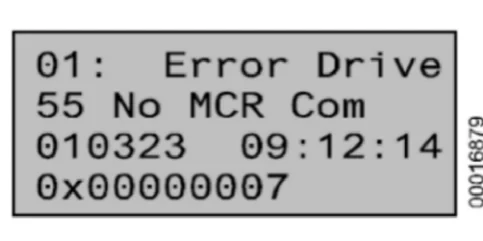
► Scroll through the fault list.
– If any faults from 1 to 19 are displayed, the fault list from 1-19 will be frozen. This allows you to track a series of faults without being interrupted by newly registered faults.
– To update the fault list, scroll to the "NEW" index.
Clearing Errors
Tip:
The Clear Errors function in the ErrorLog menu can clear the error log.
► Select Clear Errors in the ErrorLog menu.
► Confirm the clear command (OK? prompt).
► Success will be displayed.
3. Check the LMS
► Perform the check on the HMI
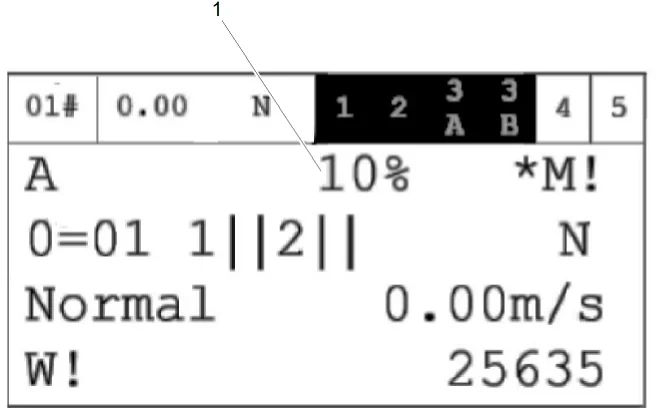
1 LMS
| Symbols/Abbreviations | explanation |
| CAL | The LMS needs calibration. |
| CALF | LMS requires zero-load calibration that is specific to each floor. |
| UNV | LMS is unavailable. |
| DIS | LMS is disabled. |
| xx% | Ratio of elevator car load to rated load (%) |
► Alternatively, use iSPECI to read information from the LMS.
4. Perform braking tests from outside the hoistway.
► To initiate a call from inside the elevator car, disconnect the safety circuit using the following switches:
– KTS
– KNET (check the audible signal) (for TSD21).
– JHR
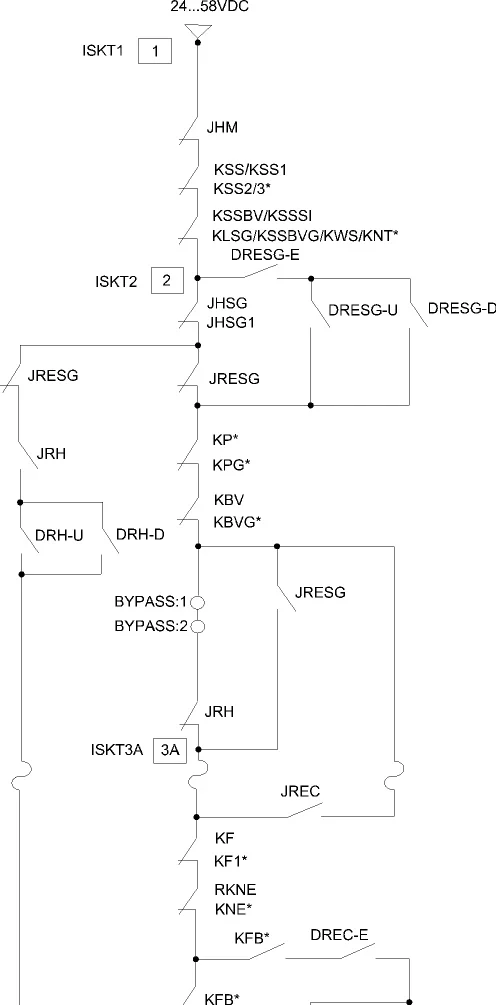
5. Safety circuit tap
6. Use KTS for pit inspection and repair/reset.
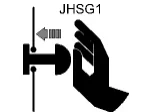
► Press the JHSG1 stop button.
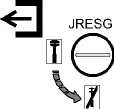
► Set the JRESG switch to NORMAL.
If the elevator car is in the door zone, the elevator controller sends a locking command to all landing doors.
► Open the landing door and exit the pit.
► Ensure the pit ladder is in the retracted position.
► Release the JHSG1 stop button.
If the landing door is closed when releasing the JHSG1 stop button:
A beeping sound will be emitted, the LREF light will start flashing, and the deactivation process needs to be restarted (return to "Press the JHSG1 stop button").
► Close the landing door.
► Wait for the beeping sound, then proceed with the dedicated triangular key operation.

► Perform the following triangular key operation:
Unlock (1...3 seconds) → Lock (1...3 seconds) → Unlock (1...3 seconds) → Lock the bottom hall door.

► A 10-second long beep confirms that the deactivation is complete. If the lobby door is opened during the long beep, the deactivation will be canceled, and the process will need to be started again from the beginning.

► If there is no beeping sound: Elevator status 65 remains active, and the triangular key operation must be performed again.
Tips:
Alternative methods for the dedicated triangular key operation:
– Use the RST INSP button on the SMICHMI circuit board.
– Apply special command 161 on the HMI.
7. Use JRESG-A for pit inspection and restoration.
► Press the JHSG1 stop button.
► Set the JRESG switch to NORMAL.
If the elevator car is in the door zone, the elevator controller sends a locking command to all landing doors.
► Open the landing door and exit the pit.
► Ensure the pit ladder is in the retracted position.
► Release the JHSG1 stop button.
If the landing door is closed when releasing the JHSG1 stop button:
A beeping sound will be emitted, the LREF light will start flashing, and the deactivation process needs to be restarted (return to "Press the JHSG1 stop button").
► Close the landing door.
► Wait for the beeping sound, then proceed with the dedicated triangular key operation.
► Perform the following triangular key operation:
Unlock (1...3 seconds) → Lock (1...3 seconds) → Unlock (1...3 seconds) → Lock the bottom hall door.

► A 10-second long beep confirms that the deactivation is complete. If the lobby door is opened during the long beep, the deactivation will be canceled, and the process will need to be started again from the beginning.

► If there is no beeping sound: Elevator status 65 remains active, and the triangular key operation must be performed again.
Note:
Alternative methods for operating with the dedicated triangular key:
– Use the RST INSP button on the SMICHMI control panel.
– Apply special command 161 on the HMI.
8. TSD21 Reset
► Switch JRESG to "Inspection" mode.
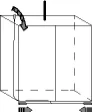
► Check and confirm that all stop devices have been released, and that all landing doors are closed and locked (using HMI command 162, the controller will send a lock command to any available door in the system. This helps to close the safety circuit during the TSD21 hardware exit procedure).
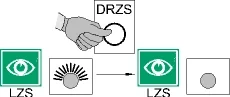
► Unlock and press the DRZS button on the SMICHMI to reset the TSD21 system.
► Upon successful reset, the LZS (RD) LED should turn off.
► Relock the DRZS button.
► Send a call signal from inside the elevator car.
► Ensure the elevator reaches the desired floor.